How YouTube recommends videos: what is confirmed and what is a guess
In short
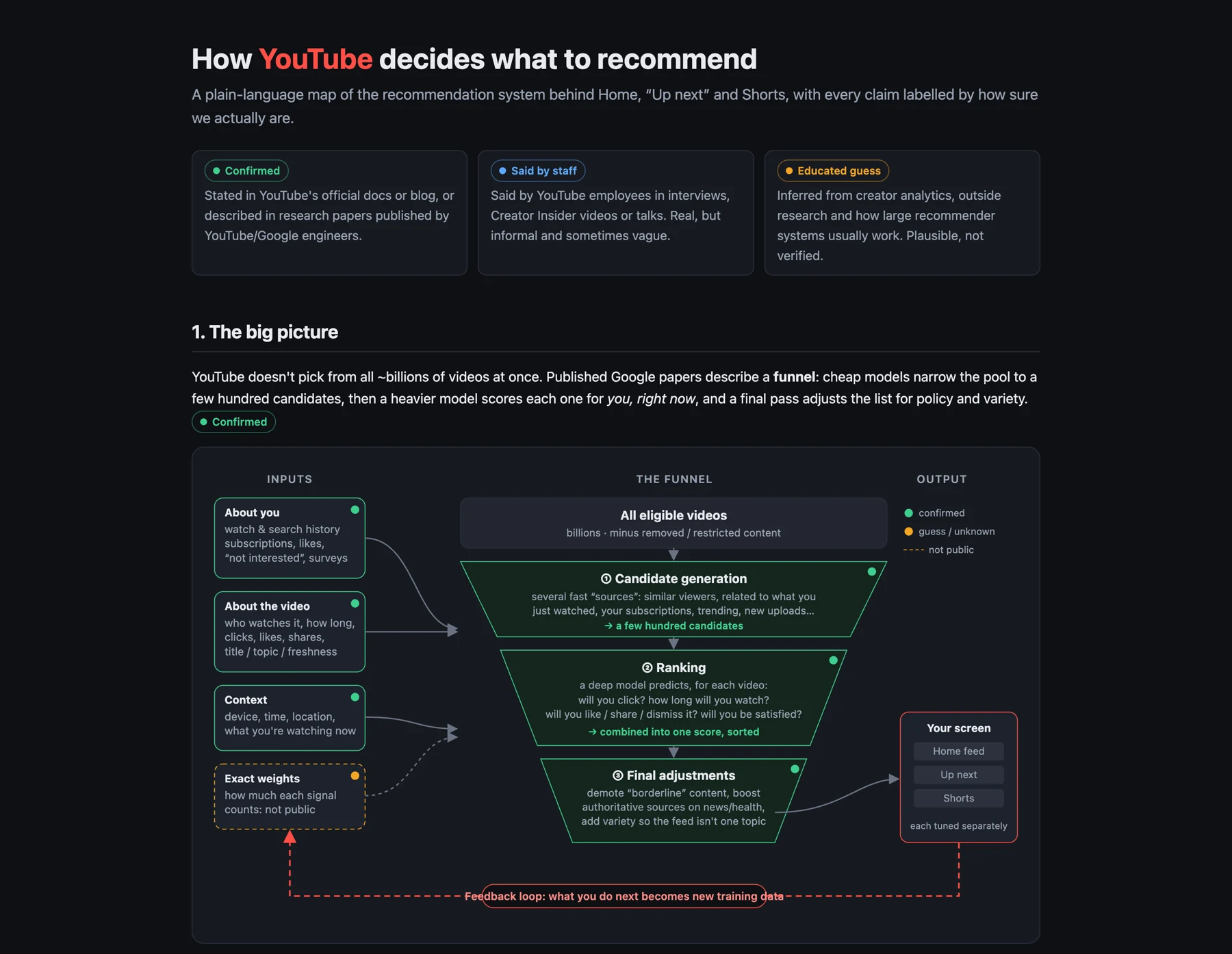
YouTube describes recommendations as a funnel: a very large catalog is cut to a few hundred candidates, a ranking model scores each one for the viewer in front of the screen, and a last pass adjusts the list. The shape is documented. The weight of each signal is not.
The recommendation system is a funnel#
Two research papers by YouTube and Google engineers describe the same structure. A first stage picks a few hundred candidate videos for one viewer. A second stage scores those candidates and sorts them. The 2021 post by YouTube's VP of engineering, Cristos Goodrow, adds what is learned from viewers along the way, and the how-it-works pages describe Home and Up next as separate surfaces.
Stage one: candidate generation#
The 2016 paper by Covington, Adams and Sargin describes a model that takes a viewer's history and context and returns a few hundred videos out of a very large catalog. It uses several sources of candidates and learned representations that place similar videos and similar viewers close together.
For a creator, the practical reading is that a video has to be close to something the viewer already watched, or to viewers like them, to reach the second stage at all.
Stage two: ranking#
The 2019 paper by Zhao and colleagues describes a ranking model that predicts several outcomes for each candidate. Some are engagement outcomes, such as clicks and time watched. Others are satisfaction outcomes, such as likes and survey ratings. The paper also describes a correction for position bias, so a video that was clicked only because it sat at the top is not automatically treated as better.
How the predictions are combined into one score is not public.
Stage three: adjustments after ranking#
YouTube has said that videos it classifies as borderline are demoted in recommendations, and that for news and information topics it promotes sources it rates as authoritative. How much variety is mixed into a feed, and by what rules, is not documented. Treat any specific number you read about it as a guess.
Which signals are confirmed#
| Signal | What the sources say | Status |
|---|---|---|
| Watch time | Added as a signal in 2012, because clicks alone can reward misleading titles. | Confirmed |
| Survey responses | Viewers rate videos in short surveys, and models are trained to predict what each viewer would rate highly ("valued watch time"). | Confirmed |
| Likes, dislikes, shares | Listed as signals in the 2021 post. | Confirmed |
| "Not interested" and "Don't recommend channel" | YouTube Help says this feedback may be used to tune your recommendations. | Confirmed |
| Watch history and subscriptions | Described as inputs. You can pause or delete your watch history. | Confirmed |
| Clicks on titles and thumbnails | A signal, and YouTube says clicks on their own are unreliable. How much they count is not public. | Confirmed input, weight unknown |
| Relative weight of each signal | Not published, and it changes over time. | Unknown |
| New videos go to a small test audience first | Creators report it often. YouTube has not documented the mechanism. | Educated guess |
| How Shorts are ranked | The how-it-works recommendation pages do not cover Shorts. | Unknown |
| Upload frequency as a ranking input | We found no primary source either way. | Unverified |
What this means for your videos#
Your competition for a given viewer is the other few hundred candidates picked for that viewer, which is a different pool from one viewer to the next. Two things you can check in YouTube Studio follow from the ranking stage: whether people who click keep watching, and whether a video reaches people through browse and suggested traffic as well as search.
Read click-through rate and retention together. A high click-through rate with weak retention points to packaging that promises more than the video delivers, and the ranking stage is built to notice that gap.
How the diagram was made#
The diagram is from our daily prompt series. We gave Claude Opus 5.5 in Claude Code one request in an empty folder: "Explain how YouTube decides which videos to recommend as an HTML page with a diagram. Be clear about which parts are publicly confirmed and which are educated guesses." The page is exactly what came back, with no edits.
The text above is not a copy of it. We checked the page's claims against the sources and changed three things:
- The page said YouTube switched to watch time in 2012. The 2021 post says watch time was added in 2012, so the table says added.
- The page labelled upload frequency as something staff have addressed. We could not find a primary source, so it is marked unverified.
- The page listed location and time among the signals. The how-it-works pages do not list them, so we left them out.
The sources are the 2016 and 2019 papers (Deep Neural Networks for YouTube Recommendations and Recommending What Video to Watch Next), Cristos Goodrow's 2021 post On YouTube's recommendation system on the YouTube Official Blog, the recommendations page on How YouTube Works, and the YouTube Help page on managing your recommendations. The papers describe the system as it was in 2016 and 2019, so use the funnel as the reliable shape and the details as dated.
Common questions
How does YouTube decide what to recommend?
Published papers describe a funnel. A first stage picks a few hundred candidate videos for the viewer, a ranking model scores each one on predicted engagement and satisfaction, and a final pass adjusts the list. The weights are not public.
Does YouTube show a new video to a test audience first?
Many creators report it, but YouTube has not documented it. Treat it as an educated guess.
Where can I see how viewers find my videos?
Open Analytics in YouTube Studio, then the Reach tab, and look for the Traffic source types card. Studio changes its layout from time to time, so use the search box in Studio if the name differs.
Check this on your own channel
Run a free audit on your channel's public videos. It shows average views per video, monthly uploads, and median views by video length and title pattern.
Analyze my channel for free